Virtual Staging Concepts for an Empty NYC Apartment: What Today's AI Models Get Right, and Why I'm Waiting for Nano Banana Pro 2
Empty pre-war apartments photograph badly. The herringbone floors and big windows that make them special just read as "bare" in a listing thumbnail, and buyers scrolling on a train don't imagine a sofa. Physical staging fixes that, but for a one-bedroom rental it can cost more than the first month's commission.
I'm an agent who also does light staging for my own listings, and I wanted to know if AI image models could at least produce staging concepts: something I can show an owner to agree a furniture direction before anyone carries a couch up a fifth-floor walk-up. I spent about 80 cents testing four models on one room.
The room and the rules
I didn't want to put a client's apartment into a test, so I generated a stand-in. Nano Banana Pro made an empty living room for me at 2K: two six-over-six windows facing a brick building with a fire escape, a radiator under the left window, a doorway on the right, crown molding and an oak herringbone floor. That took 27 seconds and cost $0.11. Nano Banana 2 Lite then made a furniture board for 3.5 cents: olive velvet sofa, walnut sideboard, round coffee table, brass arc lamp, cream rug, abstract print.
Then I gave both images to the four Nano Banana versions live on APIMart (Nano Banana Pro, Nano Banana 2, Nano Banana 2.1 and Nano Banana 2 Lite) with the same instruction. Sofa side-on along the left wall, sideboard on the back wall right of the radiator, print over the sofa, lamp beside it. Then the part that matters most: "Keep the room exactly as it is... Do not move, add or remove any architectural element. Only add furniture and decor."
To check that last line, I compared each result against the empty room pixel by pixel in five zones: each window, the radiator, the doorway and the ceiling line. Then I looked at every zone by eye.
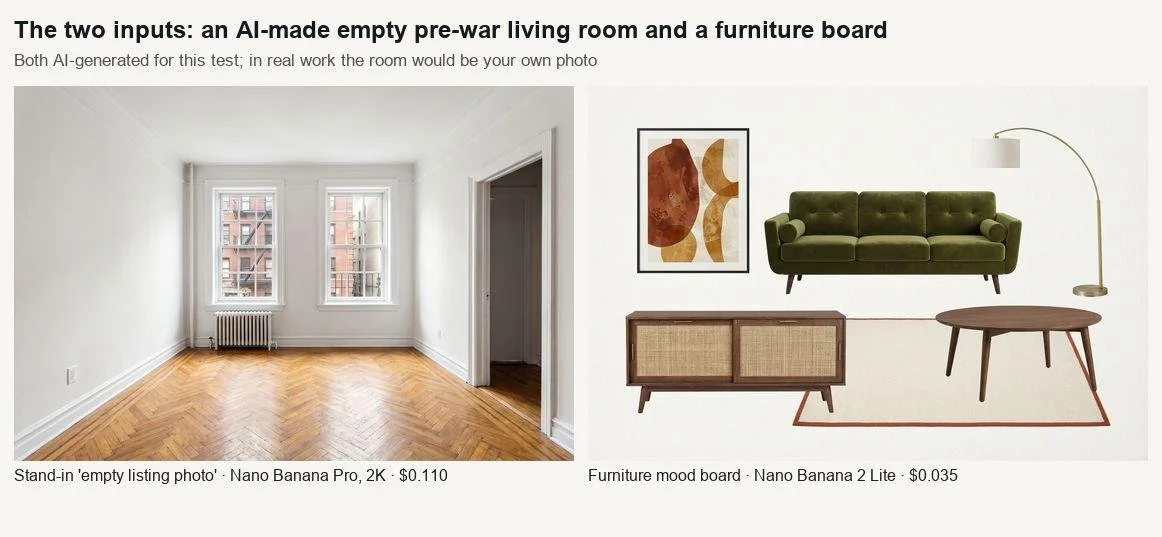
Test 1: staging from a reference board
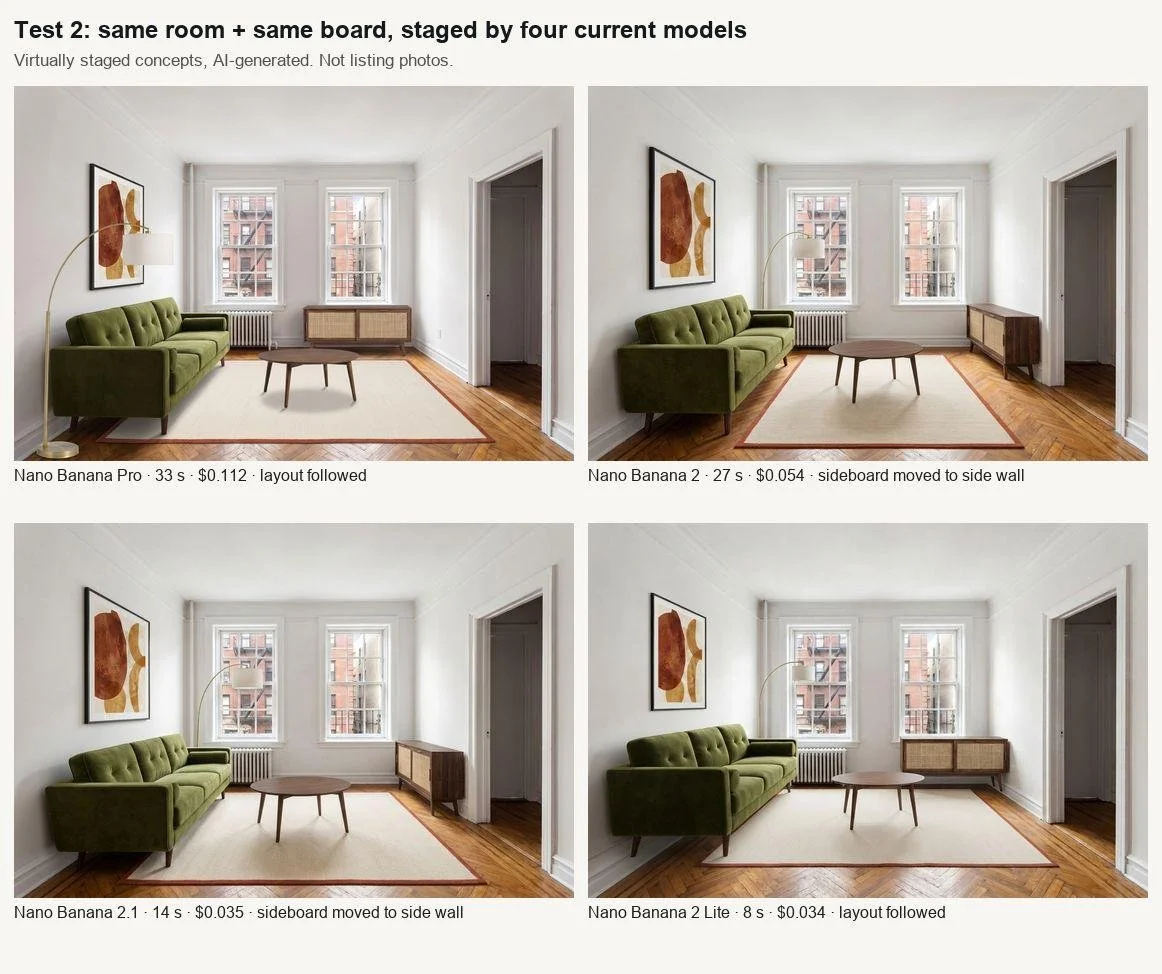
Same room, same board, four current models. Virtually staged concepts, not listing photos.
All four kept the architecture. Windows, view, doorway and ceiling changed by under 8% of pixels, and in every case the change was furniture in front of them, not a redrawn wall. No model added a window or "fixed" the radiator, and the fire escape outside stayed put.
Following the layout was another matter. Nano Banana Pro (33 seconds, $0.11 at 2K) and Nano Banana 2 Lite (8 seconds, $0.034) put the sideboard where I asked. Nano Banana 2 ($0.054) and Nano Banana 2.1 ($0.035) moved it to the side wall, right over an outlet. Pro gave the most convincing furniture, though its coffee table casts a dark, soft blob of a shadow that a photographer would never get. The board's pieces came through faithfully in all four: tufted sofa, cane-front sideboard, rust-bordered rug.
This is the point where I started looking forward to Nano Banana Pro 2. APIMart lists it as coming soon, and its workspace currently runs on Nano Banana Pro's parameters (up to 14 reference images, up to 4K output), so prompts and furniture boards set up now can run the day it launches. Fourteen reference slots means a real stager's inventory, photographed piece by piece, could go into one request.
Test 2: style variants without a board
Owners always ask "what would it look like if...". So I asked Nano Banana 2 and Nano Banana 2.1 for two text-only styles on the empty room, Scandinavian and warm minimal, with the same keep-the-room wording.
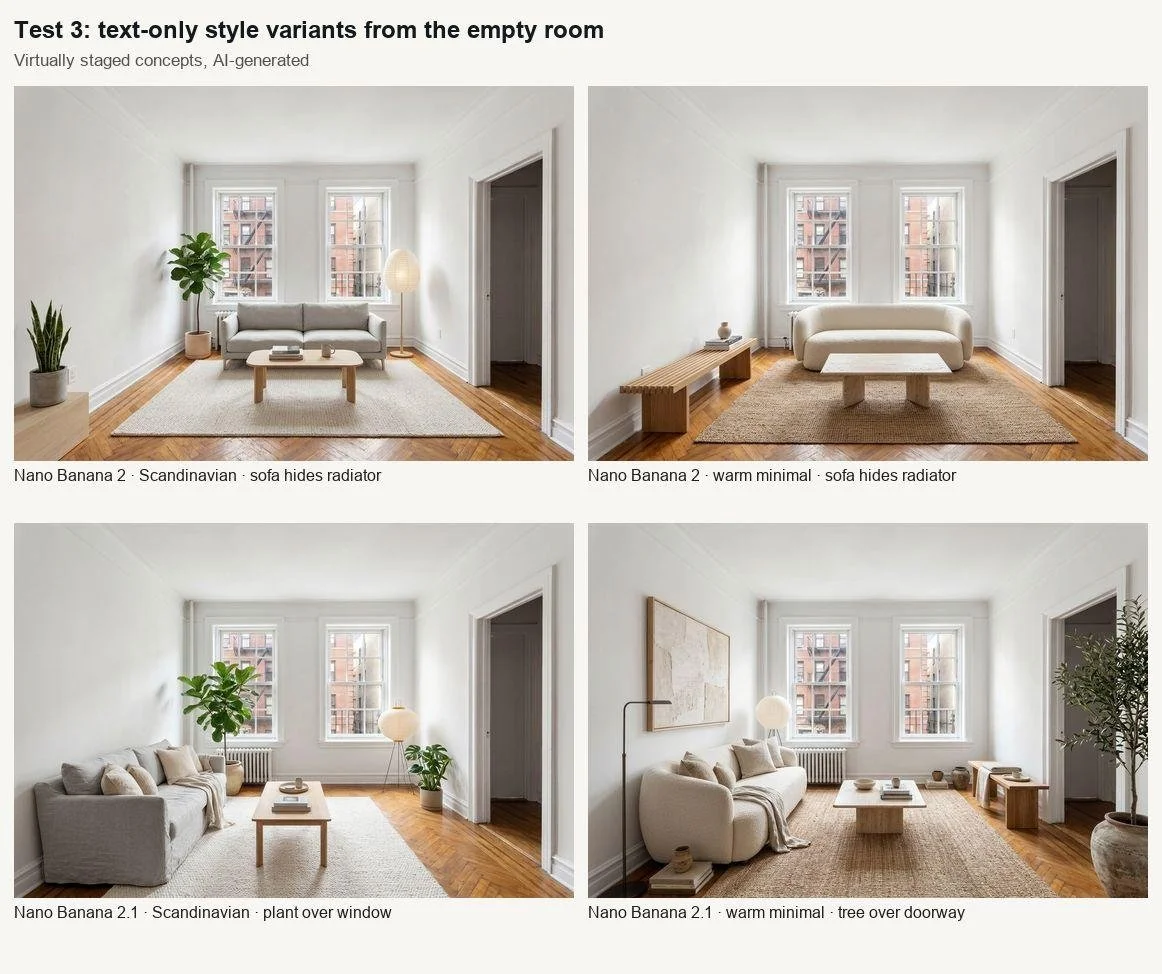
Text-only style variants. Nothing was redrawn, but features got hidden.
No architecture was rebuilt, but features got hidden. Nano Banana 2 parked the sofa right in front of the radiator in both versions (52 to 57% of that zone changed). Nano Banana 2.1 put a fiddle-leaf fig across a quarter of the left window in one version and an olive tree across the doorway in the other. Nobody stages a sofa against a radiator in real life, and a buyer who later finds the "hidden" radiator feels misled even if nothing was technically altered. Nano Banana 2 took 14 seconds per image and 2.1 about 27, at $0.054 and $0.033.
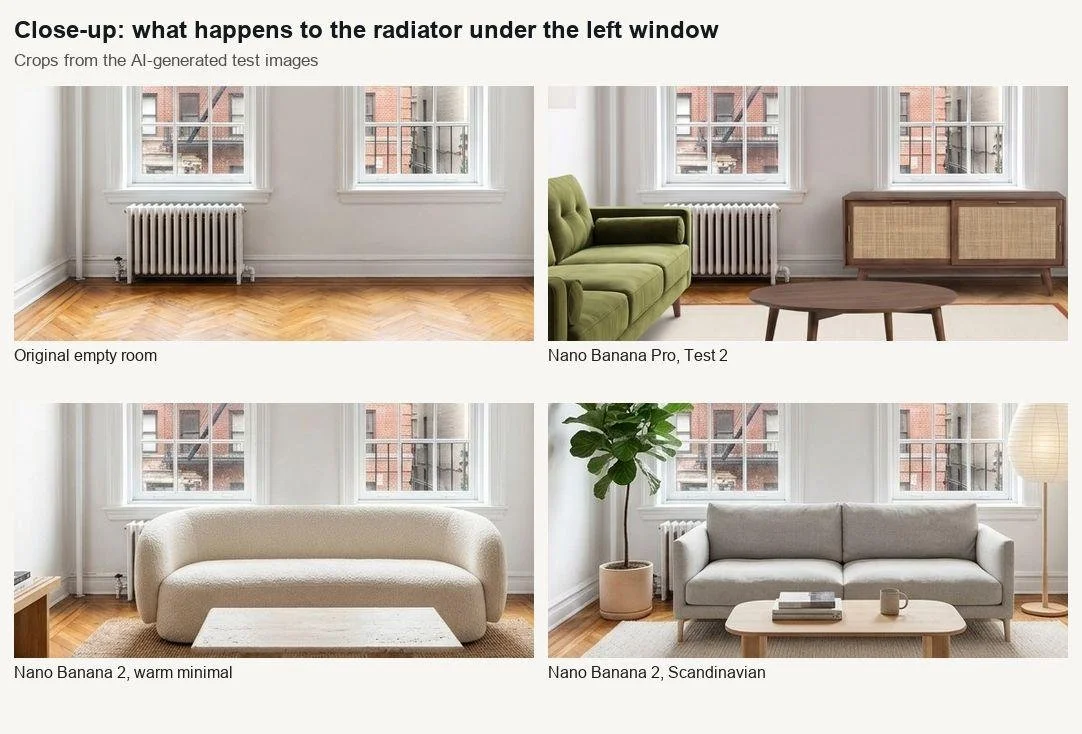
The radiator check. Visible in the original and the Nano Banana Pro staging, covered by the sofa in both Nano Banana 2 variants.
Test 3: the revision round
Owners also change their minds. I took the Nano Banana Pro staging and asked all four models: "Replace only the green velvet sofa with a cognac brown leather sofa... Change nothing else." This was the best result of the day. Outside the sofa, only 0.6% of pixels changed for Pro, Nano Banana 2 and 2.1, and 0.9% for Lite. Times ran from 7 seconds (Lite) to 27 (Pro and 2.1).
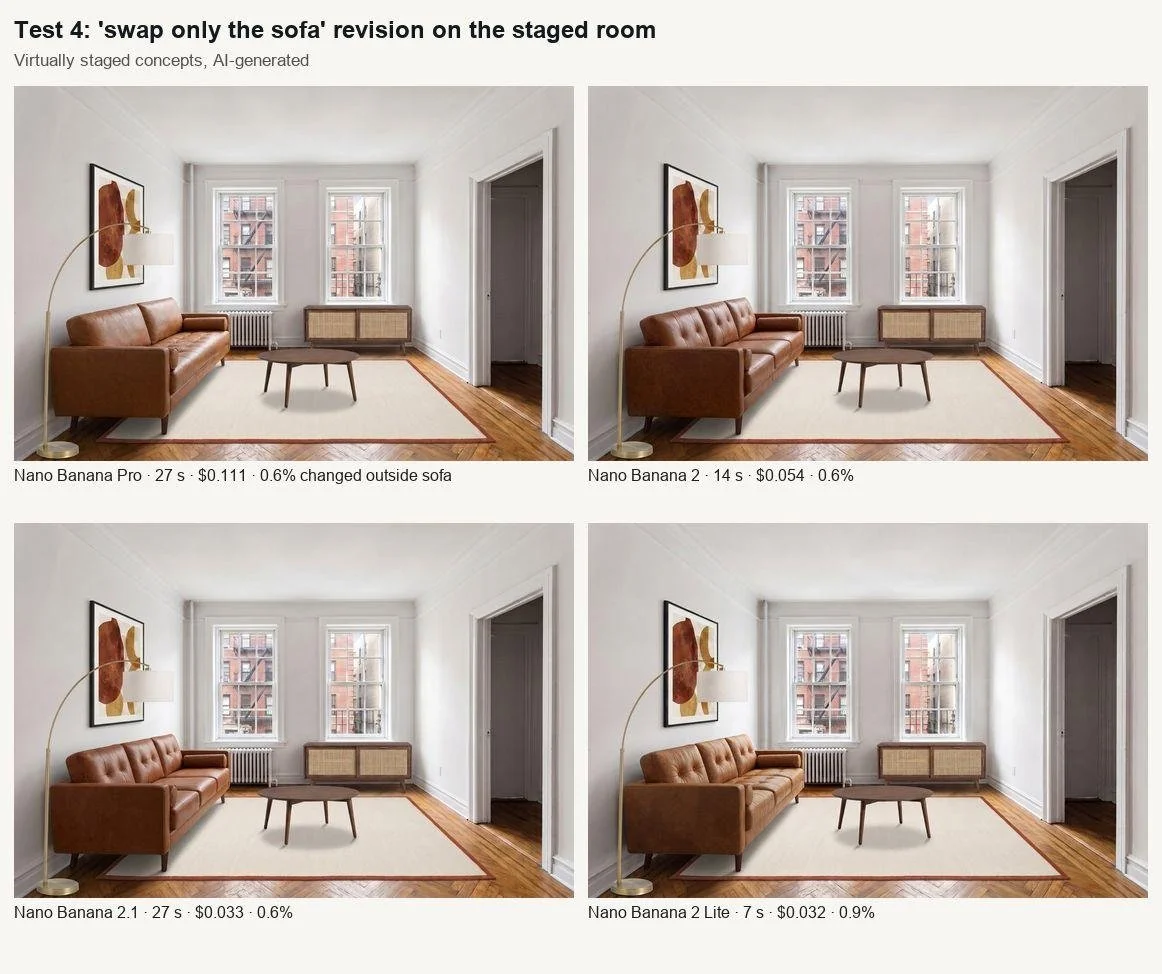
One-item revision. Everything except the sofa stayed put in all four.
The honesty part
None of this goes into a listing without rules. Mine are simple. Every virtually staged image is labelled "virtually staged" on the image itself. The real empty photo sits right next to it. Nothing structural changes: no walls, windows, views, fixtures, flooring or light that isn't there, and no hiding radiators, cracks or a neighbour's wall. Your brokerage and your listing service may have their own rules on virtual staging and disclosure, so read them before you post, and when in doubt, show less.
What I'm preparing now
Total spend was $0.79 for 14 images. Today these models are good enough for owner conversations and direction boards, and not yet for listing-grade photos I'd sign my name to. Lighting is a bit too even, shadows a bit too soft, and furniture placement drifts. What I hope Pro 2 brings is Pro's realism combined with strict obedience to layout instructions. That is a hope, not a spec.
Until launch, I'm keeping a folder per listing: the empty photo at full resolution, a furniture board of up to 14 pieces, a layout prompt with exact positions, and a checklist (radiators, outlets, windows, doors and view all visible and unchanged). On launch day it's one setting change and a re-run.