How Residential Property Teams Create Employee Onboarding Videos Without Losing the Human Touch
Residential property directors and leasing managers create employee onboarding videos so newly hired concierges, leasing associates, and resident service coordinators master building systems before stepping up to a busy lobby desk. Anyone who has managed a multi-building residential portfolio in peak summer leasing season knows how fragile traditional front-desk onboarding can be. A new concierge arrives on Monday morning, gets handed a three-ring binder of house rules, and spends two shifts shadowing the lead desk attendant between package deliveries, dog walkers, and move-in vans.
By Saturday morning, that new hire is working the lobby console solo when an unscheduled contractor crew arrives at the loading dock without a Certificate of Insurance (COI) while a prospective tenant walks in asking for an unscheduled tour. If the morning attendant never happened to encounter a COI rejection during those two shadow shifts, the new hire either waves an uninsured vendor into the freight elevator or holds up the lobby line calling the property manager's cell phone.
Hospitality-grade residential buildings run on warm, personal service, and no video clip replaces learning how to greet residents by name. What short onboarding videos replace is the chaotic, inconsistent verbal pass-down of standard operating rules.
Why Shadowing Alone Fails When Teams Create Employee Onboarding Videos
Peer shadowing is essential for teaching building culture, yet relying on shadowing to teach technical and compliance rules creates three predictable gaps across a residential staff:
- Every shift experiences a different set of building events: A new hire who shadows two quiet Tuesday afternoon shifts may see fifty parcel scans and zero amenity-room deposit disputes, service-elevator lockouts, or emergency water-shutoff notifications.
- Workarounds get passed down as official policy: Over time, veteran staff develop informal shortcuts, such as holding a physical master key without logging the contractor's ID in the desk ledger. When new hires learn exclusively by watching peers, those habits multiply across shifts.
- Compliance and Fair Housing standards require exact wording: In residential leasing and prospect reception, every associate must follow identical, non-discriminatory standards for tour qualification, occupancy disclosures, and service-animal or accommodation requests, as outlined in the U.S. Department of Housing and Urban Development Fair Housing Act overview. Verbal summaries delivered between lobby phone calls rarely cover those requirements with the precision they demand.
When property operations teams turn their written house manuals into structured two-minute video modules, every new hire sees the exact same baseline rules before their first live shift starts.
Dividing the Building Manual Between Screen Modules and Physical Walkthroughs
The smartest residential operators never try to turn their entire property binder into screen time. Instead, they split onboarding into two complementary tracks: procedural rules taught through short video briefings, and spatial or interpersonal skills taught on the building floor.
Phase 1: Pre-Shift Screen Modules for Desk Systems and Compliance
Anything that involves software fields, document verification, or standardized phone and lobby protocols belongs in a 90-to-120-second video module. That includes how to check the expiration date and additional-insured endorsement on a vendor's COI PDF, how to block out the service elevator for a four-hour move-in window, how to log refrigerated grocery deliveries in the package room, and how to route urgent HVAC or plumbing work orders vs. routine cosmetic requests.
Phase 2: On-Floor Shadow Walks for Spatial Memory and Hospitality
Once a new hire has watched the procedural clip, the building supervisor uses floor time for things a screen cannot teach: walking the basement mechanical corridor to locate the domestic cold-water isolation valves, practicing the physical lockbox and key-fob encoder at the front desk, checking the rooftop lounge closing checklist in person, and observing how senior staff de-escalate a frustrated resident with calm hospitality.
How Property Operations Managers Create Employee Onboarding Videos From House SOPs
Most residential management companies already have their procedures written down in Word files, PDF house manuals, or PowerPoint training slides. Rather than booking a videographer every time a building updates its package-room software or guest parking rules, operations leads create employee onboarding videos directly from those existing documents in Leadde.ai.
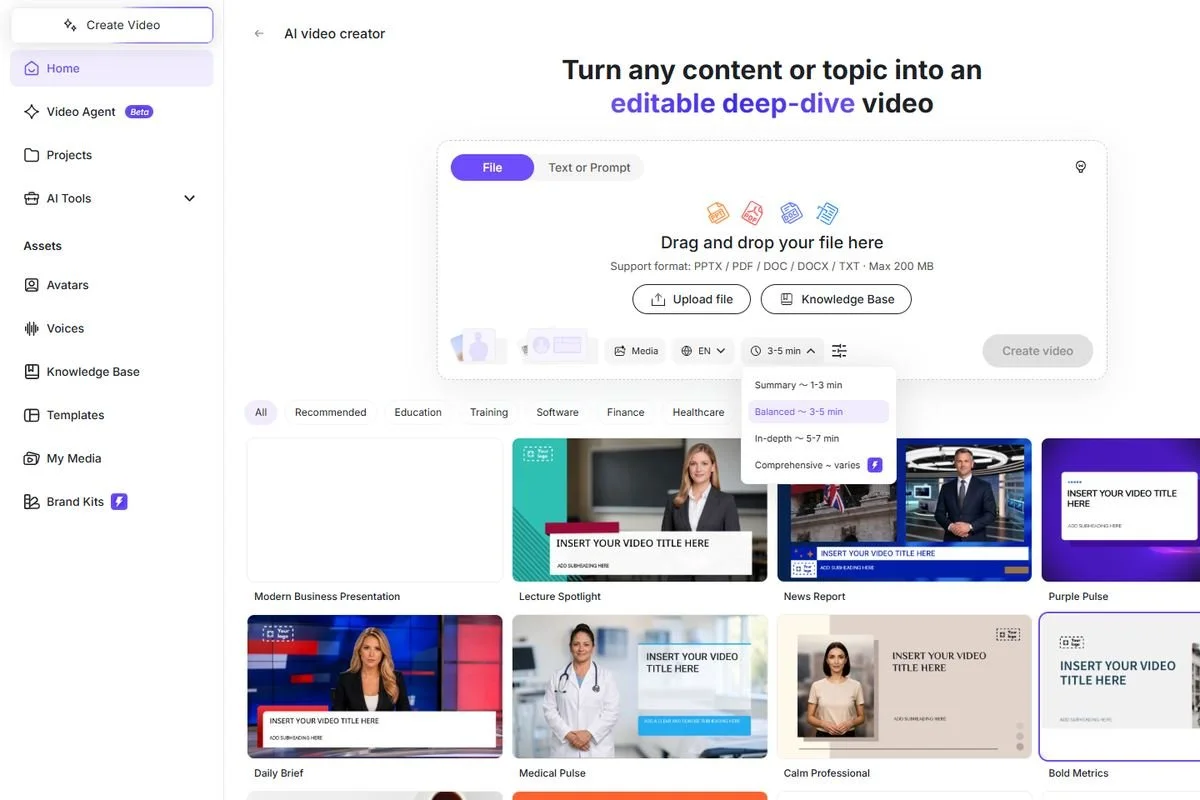
Building a front-desk concierge onboarding module from a residential property SOP document inside Leadde.ai.
A clean, privacy-safe production workflow for residential properties follows four steps:
- Scrub real resident PII from the source document before upload: Before importing any building SOP or screenshot, replace real resident names, apartment numbers, phone numbers, license plates, and active door access codes with clearly fictional placeholders (such as Resident: Alex Morgan, Unit 14B, Code 0000#).
- Import the SOP via File or Knowledge Base and split the Outline by desk task: Inside AI Video Creator, upload your .pdf, .docx, .pptx, or .txt manual (Max 500 MB, up to 100 pages per import) or select a master portfolio policy stored in the workspace Knowledge Base (100 MB per file). Review the generated Outline and split it so each video module covers a single front-desk scenario rather than a twenty-minute dump of building rules.
- Style scenes with your property portfolio's Brand Kit and clear pronunciation: Lock your management company's fonts, warm neutral color palette, and building logo inside Brand Kit. In the Studio script editor, use AI Script (Rewrite / Shorten) to make written policy sentences sound like a seasoned general manager speaking to a colleague, and use Pronunciation and Pause controls so building system acronyms (COI, FOB, HVAC, BMS) and step transitions sound natural.
- Clone modules across 88 languages for multilingual building teams: Residential building operations rely on diverse front-desk, porter, and maintenance teams. Using Leadde.ai's Duplicate workflow, a regional manager can clone a verified English SOP module into Spanish, Portuguese, Chinese, or any of 88 supported languages with synchronized .srt captions and 1080p (Full HD) MP4 export.
Structuring the First Five Shifts Around Short Video Briefings
Instead of sitting a new hire in a back office to watch twelve videos in a row on Monday morning, pace the modules across the first five shifts so each briefing is immediately followed by hands-on verification at the desk.
| Shift Day | 10-Minute Pre-Shift Video Briefing (2 to 3 Clips) | Live Lobby & Building Floor Verification | Sign-Off Owner |
|---|---|---|---|
| Day 1: Lobby Posture & Access Control | Visitor check-in rules, key-fob issuance policy, and resident privacy standards | Practice encoding a replacement fob and logging guest IDs at the reception console | Head Concierge / Front-Desk Lead |
| Day 2: Package Room & Deliveries | High-volume parcel scanning, cold-storage logging, and oversized freight handling | Scan 20 live deliveries in the package room and tag perishable items | Package Room Coordinator |
| Day 3: Move-Ins, Freight & Vendor COIs | Service-elevator booking rules and three-point contractor COI verification | Audit two real incoming vendor COIs and inspect padded elevator cab walls | Assistant Property Manager |
| Day 4: Work Orders & Escalation Triage | Distinguishing routine maintenance tickets from active leaks or lockouts | Walk the mechanical room shutoff points and log three sample tickets | Chief Building Engineer |
| Day 5: Leasing Inquiries & Amenities | Fair Housing prospect greeting rules and amenity-space reservation checks | Shadow a live prospect check-in and complete the evening amenity-deck walk | Leasing Director / Property Manager |
Pairing pre-shift video briefings with an in-person walkthrough of the building's residential amenity spaces.
When a building changes its freight-elevator hours for a facade project or switches resident portal software, the property manager only has to open the affected project in Studio, edit that single scene, and update the shared link at the front-desk terminal before the evening shift begins.