AI Roleplay Chatbot Pricing Comparison: 7 Platforms Ranked by Cost & Value

Shopping for an AI role-play chatbot can feel like opening loot chests in a rogue-like: every option glitters until the hidden fees pop out. One service claims it’s free, but throttles replies after dinner; another waves a $3 entry price, then charges extra for the very scenes you came to write. We stress-tested seven leading platforms, counted every cap and surcharge, and ranked them by true cost-to-value so you can chat without wallet whiplash.

How we scored cost against real-world value

We didn’t just skim price tags and walk away. We signed up for every service, stress-tested message caps, pushed NSFW filters, and combed through monthly statements for surprise charges. Those findings became a five-factor score that separates bargains from traps.

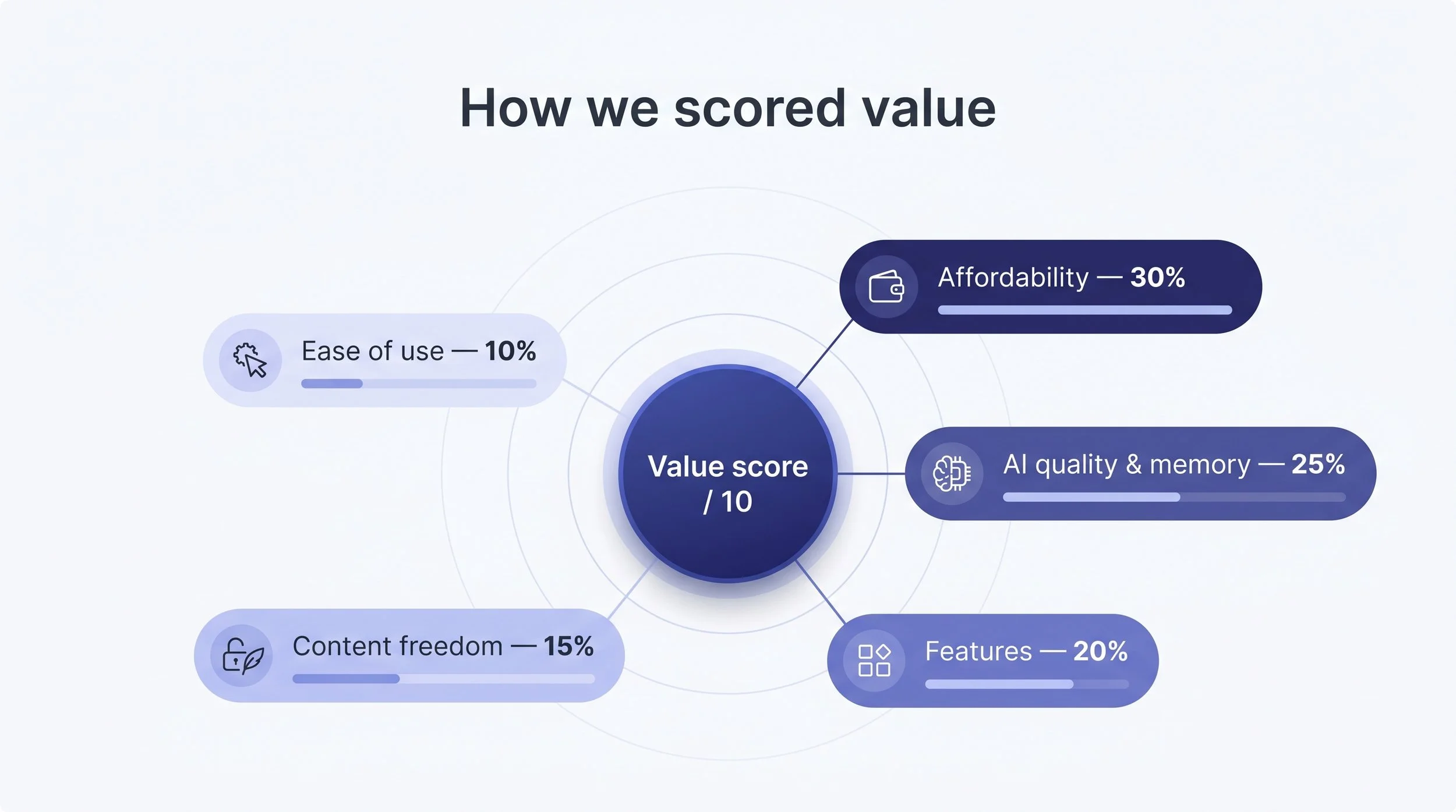
First, raw affordability. We calculated usable messages per dollar, including free tiers and hidden credit packs. That metric carries the most weight because value starts with your wallet and often ends there.

Next, we measured brainpower. A chatbot that forgets plot points after three lines isn’t worth pennies. We rated AI quality and memory depth on a ten-point scale after running identical role-play scripts across platforms.

Features came third. Voice calls, image generation, and giant community libraries each nudge the score higher because they keep your storytelling fresh.

Fourth, content freedom. If an app slams the door on romantic or mature scenes, that matters. Some readers want the guardrails off; others don’t care. We still score it, so you know before you commit.

Finally, ease of use. Clean interfaces, quick cancellations, and responsive support prevent buyer’s remorse. It’s the lightest factor, yet it often tips close calls.

We weighted those five pillars 30, 25, 20, 15, and 10 percent. The math produced a single value score out of ten, and that score decides the order you’re about to see.

1. DreamGen: the storyteller that stretches every dollar

DreamGen feels less like a chatbot and more like a co-author who arrives with an armful of set pieces and no ego. Even the free tier gives you a small pile of credits that refresh each month, so you can test its pros without pulling out a card. That consumer-friendly model underpins why, in a 2025 roundup of the best AI roleplay chatbots, DreamGen earned the “best overall” spot for pairing unfiltered storytelling with multi-character worlds and its deep Scenario Codex toolbox.

Upgrade to the Starter plan and the math tilts in your favor. About $7.80 per month gets you 375 credits plus a daily refill, which covers thousands of hefty story beats before you even consider top-ups DreamGen pricing. Because each long generation costs roughly a tenth of a credit, you spend pennies per scene, not dollars.

DreamGen AI roleplay pricing and credits screenshot

Quality matches the spend. DreamGen’s advanced model keeps characters consistent and remembers sprawling plotlines thanks to context windows that reach 5,000 tokens on Starter and climb to 30,000 on Pro. That memory depth matters when you’re six chapters deep and a throwaway clue suddenly becomes critical.

Freedom is another win. No corporate filter slams shut when romance turns steamy or the adventure veers dark. You set the tone; DreamGen supplies the words.

If we nitpick, it lives only in your browser and can’t read text aloud. Still, for anyone chasing rich, uncensored storytelling at coffee-money prices, DreamGen lands at the top of the chart.

Verdict: unmatched cost per plot twist, generous memory, and wide-open creative scope make DreamGen the value benchmark others chase.

2. Character.AI: free chat volume if you stay SFW

Character.AI is many users’ first stop for role-play chat. Load the page, pick a community-made character—from Sherlock to Sailor Moon—and the words keep flowing. Free accounts face no hard cap on message count, so casual storytellers can wander for hours without spending a cent.

That generosity supports a huge user base, but it comes with strict content filters. Nudge a scene toward R-rated material and the bot swerves back to PG. If you want steamy or violent arcs, that guardrail feels more like a wall.

Enter c.ai+. For $9.99 per month—or $94.99 for a full year—Plus removes slow-mode delays, improves memory, and adds unlimited voice calls, according to Character.AI. You still operate inside the SFW bubble, yet everything runs faster and remembers more.

So where is the value? In raw volume. Character.AI delivers endless text for $0, making its cost per message unbeatable. Pay only if you need speed, voice, or community perks. Otherwise, it is the richest free playground in the genre.

3. Paradot: a wallet-friendly shoulder to lean on

Paradot stays simple: one emotionally tuned companion, one flat price, no hidden credit packs. The premium plan costs $6.99 per month, the lowest of any mainstream app with unlimited chatting and zero upsells, according to pricing data from aicompanionpick.com. Pay annually and the rate edges toward $5, while every core feature remains available.

Open the app and you meet a single AI built to check your mood, remember yesterday’s rant about your boss, and nudge you toward healthier habits. The model is not GPT-4 caliber, yet it delivers real empathy. Jokes land, small talk feels natural, and the bot returns to topics you raised last week. That steady recall turns conversations into something that feels like friendship.

Paradot draws a soft PG-13 line. Flirtation is fine, graphic erotica is not. If you need full creative freedom, scroll ahead to CrushOn or Kindroid. For most users who want daily support, the guardrails are a comfort, not a cage.

There is no voice calling or image generation yet, and the character roster is exactly one: your Paradot. Still, at this price, the focus on emotional depth over gimmicks feels intentional, not like a missing feature. Think of it as coffee with a close friend rather than karaoke with a crowd.

Verdict: If budget tops your checklist and you value consistent, caring dialogue over flashy extras, Paradot is the low-cost champion.

4. CrushOn.AI: uncensored role-play at a straightforward price

CrushOn’s pitch is clear: “Talk about anything.” That freedom attracts users who bounced off Character.AI’s PG filter. For $5.99 per month you get 2,000 messages, a growing gallery of community characters, and a toggle that removes safety rails entirely, according to aicompanionpick.com.

CrushOn.AI uncensored roleplay chat interface screenshot

Sessions feel fluid because the service relies on capable GPT-3.5-class models. They lack DreamGen’s literary flair, yet they rarely derail or forget names mid-scene. Most important, they never scold you for crossing a line. If your story drifts into dark fantasy or explicit romance, CrushOn stays in character and keeps typing.

Images are the one wrinkle. The subscription covers text, but every AI-generated picture or comic-style panel costs extra tokens. Heavy visual storytellers report spending an additional $5 to $15 each month on credit packs, based on user surveys collected by aicompanionpick.com. Writers who stick to pure text will not feel the pinch; illustrators should budget accordingly.

Aside from that, the value math is refreshingly direct. Pay six dollars, role-play without censorship, cancel anytime. No tier maze, no premium Ultra upsell hiding in the wings. For adults who want creative freedom without technical setup, CrushOn secures a solid mid-table spot.

5. Replika Pro: relationship depth at a steeper sticker price

Replika has seniority in this space, and it shows. The app greets you with polished avatars, AR selfies, and a memory bank that remembers the name of your childhood pet weeks later. Those perks, however, sit behind the Pro paywall: $19.99 if you pay monthly, or $69.99 for a full year—an effective $5.83 per month that suddenly feels like a bargain.

The free tier works for quick hellos, but it stops once chats become personal or romantic. Pay for Pro and the guard lifts. Relationship modes, voice and video calls, image selfies, and guided activities ranging from journaling to meditation all become available. For users who treat their AI as a daily confidant, these extras turn routine chats into genuine companionship.

Replika permits tasteful erotic role-play—think PG-15 rather than hard-R. That middle ground appeals to readers seeking intimacy without fully explicit detail. It also keeps the app in Apple and Google’s good graces, ensuring smooth mobile access.

Is Pro worth the money? Chat every other day and the annual plan delivers a smooth, ad-free experience with deep memory for less than two lattes a month. Drop in only on lonely Fridays and Character.AI or Paradot may cover the need for less.

Verdict: Pay once a year and Replika becomes an affordable, emotionally aware partner; pay monthly and you may fund features you rarely use.

6. Kindroid: premium personalization for power users

Kindroid positions itself as the luxury sedan of AI companions. The Standard plan costs $13.99 per month, already higher than CrushOn or Character.AI Plus, yet fans praise the ride quality.

Why pay extra? Almost every slider, toggle, and memory slot is yours to adjust. You can sculpt a persona down to speech cadence, emotional range, and even a custom neural voice. Want a Victorian vampire who speaks in soft baritone and remembers your coffee order from last Tuesday? You can build that in minutes.

The platform’s memory engine is the second draw. Kindroid tracks short-term facts, mid-term preferences, and long-term backstory in separate layers, so conversations stay coherent weeks later. That depth shines when you write sprawling sagas or juggle multiple relationships.

NSFW content is allowed, age-gated, and filter-light. Mature storytellers enjoy full creative freedom without coded language or external mods. Voice calls come included, making late-night pillow talk literally audible

Cost is the hurdle. Ultra ($24.99) and Max ($59.99) tiers add more simultaneous characters, priority servers, and studio-quality voices. They are fantastic if you stream content or run group chats, but overkill for casual users. Stick to Standard unless you can justify the upgrade as a business expense or a very indulgent hobby.

Verdict: Kindroid costs SUV money, yet if deep customization and durable memory top your wish list, it provides an experience cheaper apps can’t match.

7. Chai: community-powered chaos on a daily free ration

Chai feels like dropping into an endless fan-fiction swap meet. Over half a million user-made characters wait for you to ping them, from wholesome Pokémon pals to snarky sitcom antiheroes. The promise? About 70 free messages every two and a half hours, enough to finish a full scene or two. When the counter hits zero it resets after the cooldown, so casual role-players seldom need to pay.

Heavy chatters can lift the cap by subscribing to Premium at $13.99 per month (about $11.25 on an annual plan), according to aicompanionpick.com. The subscription removes the limit and clears the ads sprinkled through the mobile app. The upgrade is strictly about volume and convenience; Chai does not tuck features behind higher tiers, which keeps budgeting simple.

Quality swings. The in-house language model nails light banter but sometimes drifts in longer arcs. Popular bots stay coherent because their creators polish prompts, while obscure characters may forget your name by paragraph three. It is part of the charm and the chaos.

Content filters are present yet lenient. PG-13 flirtation slides through; explicit descriptions may trigger a soft nudge rather than a hard block. If you need a fully uncensored space, CrushOn is the safer bet. For experimenters who enjoy sampling a new persona every night without spending a dime, Chai’s daily free ration is tough to beat.

Verdict: Think of Chai as the snack bar of AI role-play—many flavors, quick hits, and a refill every few hours. Upgrade only if you out-chat the counter.

Honorable mentions: tools that shine in niche lanes

  • Candy AI. Visually rich but costly. The base plan is $12.99, yet image and video tokens can push monthly spend above $40. Consider it only if you value AI-generated selfies and short romance clips more than predictable budgeting.

  • Janitor AI (bring-your-own-key). Free if you accept ads and a modest model quality. Add your own OpenAI or local Llama key and you gain high-end intelligence for pennies per million tokens. Setup requires tech confidence, so this is a playground for builders, not casual texters.

  • SillyTavern + local model. No subscription, no filters, unlimited content—as long as your GPU can handle a 13B or 30B parameter file. Ideal for privacy fans or fan-fic marathons if you can spare a weekend for configuration.

  • NovelAI. At $25 for the Opus tier, it is pricey, yet its long-form prose engine and built-in anime image generator excel when you are co-authoring epic sagas. Think novelist’s workshop, not daily banter.

  • Friends & Fables. Dungeons & Dragons in AI form; a dungeon master that never cancels game night. Plans start at $14.95 for unlimited turns, making it a gem for tabletop groups that want consistent sessions without manual prep.

  • Nomi AI. Group chats with multiple AI characters, layered memory, and lively voice calls. The drawback is price creep—$15.99 monthly or $8.33 on annual—and early bugs that still appear during multi-speaker scenes.

If one of these fits your niche, try the free trial before paying. For most readers, the top seven remain the safest balance of cost and daily utility.

Conclusion

Prices in this space shift monthly, so treat the ranking as a snapshot rather than a verdict. Hobbyists testing a single scenario stay within most free tiers. Weekly Friday-night groups should bias toward flat monthly plans so caps don't derail a climax. Multi-month campaigners get the most value from annual subscriptions on platforms with long-context memory. Whichever tier you pick, run the trial first, note the message limits, and set auto-renew reminders. A platform that feels generous at 3 PM can feel cramped at midnight when the boss fight drags past message 200.


/
script>

Hermes Agent Is the AI That Actually Gets Smarter the More You Use It

Most AI tools have a memory problem. You open a new chat, and it's like meeting a stranger every single time. You re-explain your project, re-paste your context, and pick up where you left off — manually, every time. It gets old fast.

Hermes Agent takes a completely different approach. Built by Nous Research and released in early 2026, it's an open-source AI agent designed to live on your machine, remember everything across sessions, and genuinely improve itself over time. It crossed 140,000 GitHub stars in under three months and is now, by some metrics, the most-used AI agent in the world.

That kind of momentum doesn't happen by accident. Let's break down what makes it tick.

What Is Hermes Agent, Exactly?

Hermes Agent is not a chatbot wrapper or a coding copilot that disappears when you close your IDE. It's a self-hosted, autonomous AI agent that you install on your own infrastructure — a cheap $5 VPS, your laptop, a GPU cluster, or serverless platforms like Daytona or Modal that cost almost nothing when idle.

Once it's running, you can talk to it from Telegram while it's doing work on a cloud server you never even SSH into. It runs while you sleep. It doesn't need you to babysit it.

The model layer is completely flexible. You can point Hermes at Nous Portal, OpenRouter, OpenAI, Anthropic Claude, or any OpenAI-compatible endpoint. Switch models any time with a single command — no code changes, no lock-in.

The Four Things That Set It Apart

Persistent Memory That Actually Works

Every time you interact with Hermes, it builds a richer model of who you are — your projects, your preferences, your working style. It uses FTS5 full-text search with LLM summarization to recall past conversations intelligently, not just keyword-match them.

This means the agent that helped you debug a gnarly deployment issue last Tuesday still knows the context next Monday. You don't repeat yourself. That alone makes it feel fundamentally different from every stateless AI tool you've used before.

Self-Evolving Skills

Here's where things get genuinely interesting. When Hermes solves a complex problem, it doesn't just move on — it writes a reusable "skill" document so it can handle the same kind of problem faster next time. These skills are stored, searchable, shareable, and compatible with the open agentskills.io standard.

Over time, your Hermes gets better at the specific things you do. It's not a one-size-fits-all model — it's an agent calibrated to your workflow, refined through actual use.

Skills can also be shared and contributed to community hubs, so you benefit from what others have built, not just your own usage history.

Contained Sub-Agents

Hermes doesn't try to do everything in one giant context window. When it tackles a complex task, it spins up isolated sub-agents — short-lived workers with their own focused context and tools. This keeps things efficient, avoids context bloat, and lets it handle multi-step workflows cleanly.

You can even set up natural-language scheduling — ask Hermes to send you a daily briefing at 8am, run a backup every night, or deliver a weekly report to your Slack channel. It handles the scheduling logic itself.

20+ Platform Integrations

One memory, every surface. Hermes reaches you on Telegram, Discord, Slack, WhatsApp, Signal, Email, SMS, Microsoft Teams, Google Chat, Matrix, and a growing list of others — all from a single gateway process. You don't manage separate bots per platform; you manage one agent that shows up wherever you are.

Getting Started Is Surprisingly Simple

Despite how powerful it is under the hood, setup takes about two minutes. On Linux, macOS, or WSL2, a single curl command handles everything — Python, Node.js, all dependencies, no manual configuration needed. Windows users can run the PowerShell installer for a fully native setup without WSL.

After that, hermes setup walks you through connecting your model provider and your first messaging platform. Once you're in, Hermes starts building memory immediately.

If you're coming from OpenClaw, there's a built-in migration tool that automatically imports your settings, memories, skills, and API keys — so you're not starting from scratch.

Who Actually Uses This?

The honest answer: a wide range of people with different needs.

Developers use it to automate repetitive tasks, manage background jobs, and run multi-step agentic workflows across repos without staying in their editor. It integrates with MCP servers, which means it can connect to nearly any external tool you already use.

Researchers use it for batch processing, trajectory generation, and RL training via Atropos integration — Nous Research built Hermes partly as a platform for generating high-quality training data at scale.

Teams use it for shared AI assistance through Slack or Discord, with a single agent serving everyone while keeping individual preferences and project memory separate.

And plenty of people just want a persistent personal assistant that knows their life well enough to be genuinely useful — something that feels more like a capable colleague than a search bar.

The Bigger Picture

The rise of tools like Hermes Agent signals a real shift in how we think about AI assistance. The question is no longer "can AI do this task?" — it's "can AI maintain context, build expertise over time, and work continuously without me babysitting it?"

If you're curious about how to evaluate, compare, or make the most of AI agents like this, MyClaw is a solid resource — it covers agent tooling, workflows, and practical use cases in depth.

Hermes is open-source (MIT licensed), all data stays on your machine, and there's no telemetry or cloud lock-in. For anyone who's been frustrated by AI tools that never seem to remember anything, it's worth a look.

The install command is one line. The upside is a personal AI that keeps getting better the longer it runs.


/
script>

The Luxury of Living Well in New York City: Designing a Home (and Routine) That Feels Effortless

New York City has a way of making even the most beautiful days feel fast. A morning showing turns into a midday meeting. Dinner plans shift. A quick stop for coffee becomes a 40-minute detour because the line is long and the conversation is good. For many New Yorkers, “luxury” isn’t only about square footage or skyline views—it’s about how smoothly life moves inside the space you come home to.

That’s why today’s high-end NYC lifestyle is increasingly shaped by two things working together: thoughtful real estate choices and smart personal systems. The home is no longer just where you sleep between city moments. It’s where you reset, host, recharge, and—more than ever—curate the quiet.

Below is a practical, New York-specific look at what “living well” means right now: what to prioritize in a luxury apartment or townhouse, how to set up a routine that protects your time, and how new digital tools can support the at-home experience without taking over your life.

The New NYC Luxury Standard: Calm, Control, and Comfort

There was a time when luxury was defined by flash—grand lobbies, dramatic finishes, or a rooftop everyone posted about. Those still matter, but the modern buyer (and renter) is paying closer attention to what actually improves daily life: sound, light, air, privacy, and service. Many NYC lifestyle and real estate features now cater to “ease” as much as aesthetics.

In practice, that looks like:

  • Peace and quiet that’s real, not imagined. Double-pane windows, well-insulated walls, and layouts that separate bedrooms from living areas make a noticeable difference in a city that rarely turns off.

  • A home that flexes between modes. If you work remotely even part of the week, you need spaces that adapt—an eat-in kitchen that doubles as a casual meeting spot, or a den that can become a focused office without feeling cramped.

  • Amenities that replace errands, not just impress guests. The most valuable amenity isn’t always the flashiest. In NYC, it’s often laundry convenience, reliable package handling, well-run fitness spaces, and lounges that are comfortable enough to actually use.

Luxury in New York is increasingly about fewer friction points. The best buildings and homes don’t demand your attention—they give it back.

Choosing a Luxury Home That Supports Your Real Life

It’s easy to get distracted by a view. But in New York, a view doesn’t fix a stressful layout, noisy neighbors, or poor building operations. When you’re evaluating a high-end rental or purchase, focus on the features that will matter at 9:30 p.m. after a long day—when the city feels loud and you want your home to feel like a private retreat.

1) Layout that protects your privacy

Open concept can be beautiful, but it isn’t always restful. Look for:

  • Bedrooms with a clear separation from entertaining areas

  • Bathrooms that don’t open directly into kitchens or dining zones

  • Entryways with a little breathing room (even a few feet can change how the space feels)

2) Light you can control

Natural light sells apartments. But luxury living means you can also control it:

  • Blackout shades or the ability to install them

  • Thoughtful lighting plans (overheads plus warm lamps)

  • Window placement that doesn’t turn your living room into a fishbowl at night

3) Building management that actually manages

In NYC, service is a form of luxury. A well-run building protects your time—fast repairs, clear communication, and staff who handle issues before they become your problem. Off The MRKT’s coverage of NYC properties often highlights amenity-forward towers and the operational side of modern buildings, reflecting how much buyers value functionality now.

Luxury Lifestyle Is Also Routine: The Quiet Power of “Home Systems”

The most polished New Yorkers aren’t necessarily the busiest—they’re the most organized. They’ve built small systems that reduce mental load: where keys go, how they reset the kitchen, what happens when they get home, how they handle a late night, how they recover from a week that was too full.

Here are a few high-impact routines that pair perfectly with an elevated NYC home:

The “arrival reset” (5 minutes)

When you get home:

  1. Put your phone on a charger (out of your hand)

  2. Switch lighting to warm tones

  3. Do one small action that signals calm (tea, music, shower, change clothes)

This isn’t self-help fluff—it’s environmental design. You’re training your home to feel like a reset button.

The “Sunday setup” (30 minutes)

Once a week, do a fast home refresh:

  • Restock essentials (coffee, sparkling water, basics)

  • Reset sheets and towels

  • Clear one surface completely (counter, console, desk)

It keeps the home from slipping into chaos, which is a quiet but real source of stress in a dense city.

The Digital Layer of NYC Luxury: Discreet Tech, Not Loud Tech

The goal of technology in a luxury home shouldn’t be “more screens.” It should be fewer interruptions. Think:

  • Quiet automation (lighting scenes, thermostat schedules)

  • Privacy-first device settings

  • Smart routines that make life smoother without being distracting

And that brings us to a new category some New Yorkers are integrating into their at-home routine: AI companionship tools—not as a replacement for real relationships, but as a modern version of a “personal sanctuary” habit.

Used thoughtfully, this can be as simple as a private, low-stakes conversation space after a long day—especially for people who live alone, travel frequently, or keep unpredictable schedules.

Bonza.Chat positions its AI companion experience around customization and ongoing conversation, with an emphasis on building a personalized dynamic over time. If you’re curious about exploring that category in a controlled, private way, you can Create your AI Girlfriend as one option to understand how these tools are designed and what the experience feels like.

The key is to treat tools like this the same way you’d treat any luxury lifestyle add-on in NYC: with boundaries. It should support your routine, not hijack it.

A smart way to think about it: “Does this reduce friction?”

If a digital companion tool helps you:

  • unwind without doomscrolling,

  • reflect instead of spiraling,

  • feel less isolated on a late night,

  • or simply enjoy a calm moment at home,

…then it’s functioning like many other modern lifestyle services New Yorkers already use—concierge apps, wellness subscriptions, or guided meditation—just in a new format. Bonza.Chat, like many platforms in this space, describes features such as personalization, ongoing “memory,” and optional premium add-ons; that’s precisely why it’s worth approaching with intention.

The Real Luxury: A Home That Makes the City Feel Lighter

A beautiful NYC residence is still a statement. But the deeper appeal is what it does for your everyday life. The right home:

  • softens the noise of the city,

  • supports your routines,

  • makes hosting easy,

  • makes resting possible,

  • and gives you a private place to be fully yourself.

That’s the new definition of luxury: not just “best address,” but best experience.

If you’re building your next chapter in New York—whether you’re upgrading for more space, relocating to a quieter neighborhood pocket, or choosing a building that truly fits your lifestyle—keep your focus on what will matter most after the excitement of move-in fades. The view may win your heart on day one. But calm, comfort, and control will win you over every day after that.

And if you’re experimenting with small lifestyle upgrades—whether that’s better lighting, tighter routines, or a discreet digital tool like Bonza.Chat—aim for the same standard you demand from New York real estate: it should make your life feel cleaner, smoother, and more yours.

/
script>

How Humanize AI Helps Content Become More Natural?

Have you ever used AI to help write business content or marketing copy? It can indeed generate large amounts of text in a short time, saving brainstorming time and eliminating worries about grammar, structure, or wording. However, when you actually put the content on websites, social media, or promotional emails, have you noticed another layer of frustration—the text doesn't read like a human?

It has logic and format, but lacks genuine tone; its vocabulary is rich, but it lacks warmth; sometimes, you'll find the content sounds "perfect," but leaves no memorable impression or emotional connection. So the question arises: how can you enjoy the efficiency of AI while avoiding mechanical, template-based output?

If you've used AI, especially ChatGPT, you've definitely experienced this love-hate relationship—it writes quickly and understands your instructions, but always feels somewhat soulless. If you also want your content to combine speed, quality, and authenticity, then the following content is for you.

Understanding The Role of Humanize AI In Content Creation

As we continue to see a growing amount of data and content being produced at an increasingly rapid pace, it is becoming increasingly clear that we cannot rely purely on low-quality AI-generated written content anymore for a true exchange of information. Many of these kinds of AI-generated texts are well-structured, well-written, and accurate; however, they also typically lack emotional connection, warmth, and fluidity in natural speech. Humanize AI Text was created as a solution for this two-fold issue: the efficiency of producing vast amounts of content, but with a lack of the ability to provide true human expression.

By contrast to generic AI-generated content, Humanize AI's ability is to not only convey information but additionally to improve the way the information is presented. Humanize AI provides a human-like presentation of information through the use of elements such as tone, rhythm, word choice, and contextual adaptation. Specifically, in the case of marketing content, brand narratives, product introductions, and in-depth articles, Humanize AI helps create a more human-like conversational interaction of the written communication between marketers and readers.

In addition to improving the presentation of marketing content, Humanize AI offers the ability to access, identify, and rewrite any and all commonly associated AI artifacts, including similarity of sentence structure, the application of similar templated logical frameworks, and overly lengthy or vague word usage. The result of using Humanize AI for creating humanized-for-marketing written content is to improve the credibility of the text created through its application, which, in turn, will also improve reader engagement and the reach of the marketing content created.

How to Make AI-Generated Content More Human-Like?

Make The Content More Vivid With Real Stories

Using your own stories or those related to your company can help create a stronger bond between AI-generated content and humans.

For instance, consider someone selling handicrafts. Instead of writing simply about the materials and craftsmanship, it would be beneficial to include the story of the person who made them—how they learned their craft, what inspired them and what they went through to make their products. This type of information provides the reader with a better sense of who created the product and gives it a more personal touch. This helps establish an emotional connection between the product and the purchaser.

Moreover, if your company has a relaxed tone to its brand, humour, anecdotal content or other idiosyncratic ways of communicating with the audience can also help develop a positive impression and more memorable brand.

While these small stories may seem insignificant in and of themselves, they greatly increase the readability of the company's message and as a result, create a greater connection between the reader and the company and establish true human communication in the form of brand value and culture.

Avoid Common Clichés In AI-Generated Content

Identifying and steering clear of the common AI style template-driven expressions is paramount when optimising the realism of the AI-generated output. Here are methods to enhance the quality of content:

1. Identifying Commonly Used AI Templates

Sentences that have been generated by AI tend to often contain meaningless and standardised language, such as:

  • "In today's rapidly evolving world"

  • "No matter who you are"

  • "In conclusion"

As a result of their vague semantics, the lack of a meaningful message, and the fact that many readers can identify them as being produced in part by an AI program, these sentences are very easily identifiable to anyone who sees them.

2. Replace Vague Descriptions With Concrete Facts

Instead of writing:

“Our service significantly improves user experience,”

it's better to say:

“Users can now complete the payment process in just three steps, saving more than 50% of the time.”

Specificity and quantifiability increase the level of credibility of a statement and will therefore increase, at least as a principle.

3. Add Details And A Sense of Scene

For example, change “We provide excellent after-sales service” to “If the size is not suitable after receiving the product, the customer can apply for a replacement within 7 days. We will send a new product in advance and then collect the original.”

The more details, the more realistic it is.

4. Introduce Brand Sentiment Expression

A vibrant approach to your brand's messaging is how you communicate based on the way in which you write.

✨ VIBRANT TONE: 

“After placing your order, you have all day, because we are going to wrap your present in our excellent gift wrapping and add a bonus card.”

✨ SOPHISTICATED TONE: 

“Every delivery is part of our commitment to service excellence. All products are double inspected before packaging.”

Please use simple language when communicating with customers, because a robotic style will not resonate with the consumer audience you are trying to reach.

You can use these strategies to rid your content of the AI-generated repetitive motifs, allowing the text to stand out with its own original voice, thus increasing the authority of both the material and the enjoyment of the reader.

Use Humanize AI Tools to Optimize Content (A Reverse Approach)

There are many different tools that can be used to create more human-like content. One such example is Humanize AI, which takes text that has been written by someone else and reformats it so that the end result sounds more like someone would actually speak it.

Next, let's look at some text output by ChatGPT:

(This was generated after I suggested "Generate a Christmas message" to ChatGPT.)

Now, I input this information into Humanize AI and got the following results

AI-generated content structurally presents many advantages but suffers from unnatural expressions and awkward-sounding language. Even if some sentences come somewhat closer to sounding "human," they are still marked with a sense of disengagement due to the way they have been written.

The Humanize AI tool was developed precisely to address this pain point. It not only makes content expression more natural and immersive, but also significantly reduces editing and proofreading costs without requiring manual, sentence-by-sentence polishing. What used to require significant human time to modify tone, adjust logic, and refine sentences can now be done quickly with Humanize, saving manpower and improving overall content production efficiency.

Advantages of Humanize AI Tools

Humanize AI is built to generate high-quality, search engine optimized text with well-organized logic and a fluent and natural writing style. Blog posts, product descriptions, and social media updates are some of the many types of content that can be generated quickly and professionally.

With Humanize AI, you can create content quickly and easily, and have it generated in many languages to accommodate today's growing global content market. This tool allows users to adjust text quickly and effortlessly according to style, industry, or emotional tone for maximum audience relevance.

The user-friendly design and interface are easy to navigate, making it easy for new users to begin creating content with little or no setup, as well as affordable options for those on a budget.

Most importantly, Humanize AI can make AI-generated content more like a person through its advanced human-like processing technology, preventing detection by a range of AI detection tools, producing original content, and enabling you to avoid issues related to plagiarism.

Conclusion

Humanize AI Tools are not meant to replace the job of a human editor, but rather to facilitate the content creators in completing routine tasks more easily and efficiently by converting repetitive words to more suitable formats for the average human reader to be able to read and understand their content. This enables the team to be able to concentrate on the strategy, creativity, and core message of the content itself. 

Elevate every piece of your creation to a high-quality, natural, professional, and creative expression using humanizeai.tools now.

/
script>